
Microsegmentation limits which devices can talk to which other devices. If one device is compromised, the attacker cannot use it to reach the rest of the network. BlastShield does this with groups and policies. Devices are placed in groups, a policy names which group may start connections to which other group and which services it may use, and every other connection is refused. This article explains the pieces, how a policy is checked and two examples. The first example is a policy from a live 1.14.4 Orchestrator. The groups and policies do not depend on VLANs, subnets or firewall rules on the underlying network.
Applies to: BlastShield Orchestrator 1.14.4
Terms used in this article
-
Gateway. A BlastShield device that protects the Endpoints behind it. It can be a hardware appliance or a virtual instance.
-
Endpoint. A device that sits behind a Gateway and runs no BlastShield software. Examples are a PLC, an IP camera, an IoT sensor or a server.
-
Agent. BlastShield software installed on a server or workstation. It gives that host its own place on the BlastShield network.
-
Group. A named set of devices. A group can hold Endpoints and Agents. A device can belong to more than one group.
-
Service. A named set of protocols and ports, such as Microsoft RDP (TCP/3389) or Network Time (UDP/123).
-
Policy. A rule that connects groups. It names one or more "From" groups, one or more "To" groups and the services the connection may use.
Groups can also hold users. A policy from a user group to a device group is how a person is given remote access. That is access control for people and is covered in the remote access articles. This article covers devices only.
Groups
A group is a label you choose for a set of devices that should be treated the same way. Typical groups follow function or location: all PLCs in one production cell, the historian servers, the cameras in one building.
-
A group has no maximum size.
-
A device can be in several groups at once.
-
Saving a change to a group pushes the updated policy across the network immediately.
-
The Groups page lists each group's members and the policies that use it.
-
Groups are independent of the physical network. Two devices in the same group can be on different sites and two devices on the same switch can be in different groups.
Create groups in the Orchestrator under Access Control > Groups.
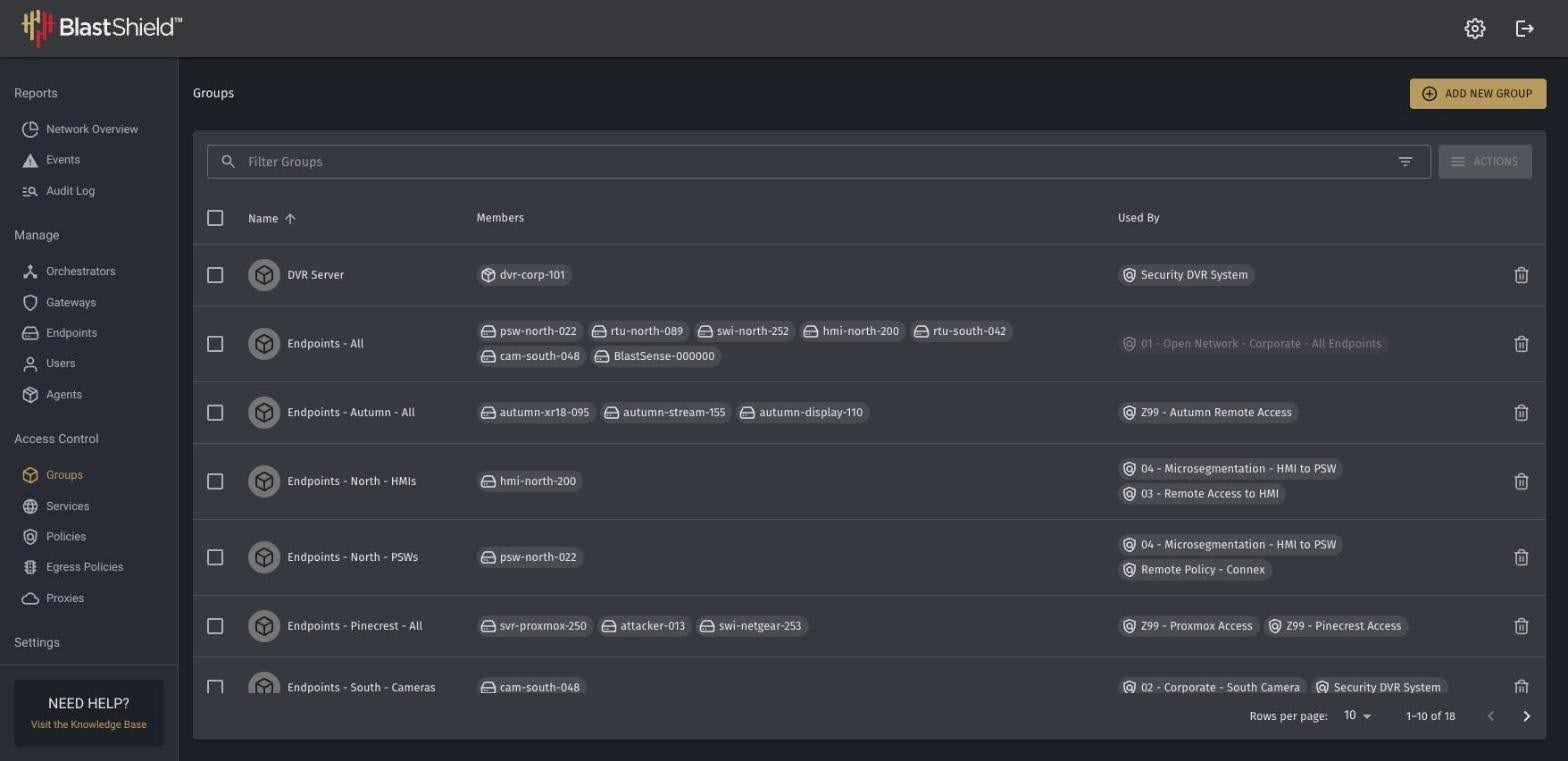
Policies
A policy connects groups. It has a "From" side, a "To" side and a list of services. Members of the "From" groups may start connections to members of the "To" groups, and only over the listed services. Members of the "To" groups may not start connections to the "From" groups. A policy can list a single service, several services or Any.
-
Policies are directional. For two-way permission, create a second policy in the opposite direction.
-
A group can appear in several policies.
-
Policy Enabled turns a policy on or off without deleting it. A disabled policy has no effect and is shown greyed out in the list.
-
Log matching connections records each connection that the policy allows.
Create services under Access Control > Services and policies under Access Control > Policies.
Default deny
Access is closed by default. Devices cannot reach or see each other unless a policy allows it. A connection that matches no policy is dropped. Policy decides who may connect. Cryptographic authentication between BlastShield nodes decides who can take part at all.
Endpoints are not reachable from the underlying network. Each Endpoint has an address inside the BlastShield network, and that address is invisible to the underlay.
Policy applies to traffic over the BlastShield network. Traffic that an Agent host sends over its normal network connection is outside BlastShield and is not covered by a policy.
Where policy is enforced
The Orchestrator introduces two peers to each other and then leaves the path. It does not carry the traffic. The Gateway ends the tunnel for the Endpoints behind it, applies policy and forwards only the traffic that policy allows. A packet that policy does not allow is dropped and the connection is reset.
This means a policy applies the same way wherever the devices are. It does not matter whether the two devices are at one site, at two sites or in a cloud provider.
Devices on the same local network
Policy can only act on traffic that passes through a Gateway. For Endpoints behind the same Gateway, MAC and VLAN addressing modes send all Endpoint traffic through the Gateway, including traffic between local Endpoints. How the Endpoints are cabled also matters:
-
On a managed switch in port isolation mode, or with a dedicated VLAN per port, Endpoints are isolated from each other and policy applies between them.
-
With a Gateway that has a dedicated downstream interface for each Endpoint, policy applies between them in every addressing mode.
-
On an unmanaged switch, Endpoints are not isolated from each other locally.
See "Local Segmentation and Isolation of Endpoints" and "Gateway Addressing Modes" on the support site for the full deployment options.
Addressing mode also decides who can start a conversation. In Source+Destination NAT mode, Endpoints cannot initiate connections over the BlastShield network. They can only receive them. A policy that lets such an Endpoint "start" connections has no effect until the mode is changed.
Examples
Example 1 is a policy from a live Orchestrator. Example 2 is an illustration. The group names in Example 2 are chosen for the example.
Example 1. HMIs may reach one set of devices over web services only
In this network, the HMI Endpoints need to reach the PSW Endpoints and nothing else needs to. The PSW Endpoints do not need to reach the HMIs.
-
Group "Endpoints - North - HMIs" holds the HMI Endpoints.
-
Group "Endpoints - North - PSWs" holds the PSW Endpoints.
-
One policy: From "Endpoints - North - HMIs", To "Endpoints - North - PSWs", Services "Web Services".
The HMIs can start connections to the PSWs, and only over Web Services. The PSWs cannot start connections to the HMIs. Every other Endpoint is outside both groups, so the policy gives it nothing. The policy logs each connection it allows.
Example 2. A sensor that can report out and nothing else
An IoT sensor system sits behind a BlastShield Gateway. A monitoring platform runs in a private cloud and is protected by a virtual Gateway. The sensors must send data to the monitoring platform. Nothing else should be able to reach them, and they should reach nothing else.
-
Group "Sensors" holds the sensor Endpoints.
-
Group "Monitoring" holds the monitoring platform.
-
One policy: From "Sensors", To "Monitoring", Services set to the one service the sensors use to report.
The sensors can start connections to the monitoring platform over that service. The monitoring platform cannot start connections to the sensors. Any other IoT or OT device is outside the "Sensors" group, so it cannot use the policy. The sensors have no policy to any other system, so they cannot reach one.
Outbound access for isolated Endpoints
Some Endpoints behind a Gateway need a limited path to the outside, for example an update server or an NTP server. Egress policies control this. An egress policy applies to an Endpoint group and lists the allowed DNS names, the allowed prefixes and the allowed services. The Endpoints can reach only what the egress policy lists.