
The BlastShield Agent is a lightweight application that connects the server or workstation it is installed on to the BlastShield network. It adds a virtual network interface to the host. An Agent host is a peer like a Client or a Gateway: it never accepts inbound connections. It connects out to the Orchestrator, which introduces it to the Gateway that protects the Endpoint. The two then build an encrypted tunnel directly between themselves. This article explains each step, what the virtual network interface does, the firewall rules involved, and what happens when a NAT or firewall prevents the direct tunnel.
Applies to: BlastShield Orchestrator 1.14.4
Connection diagram
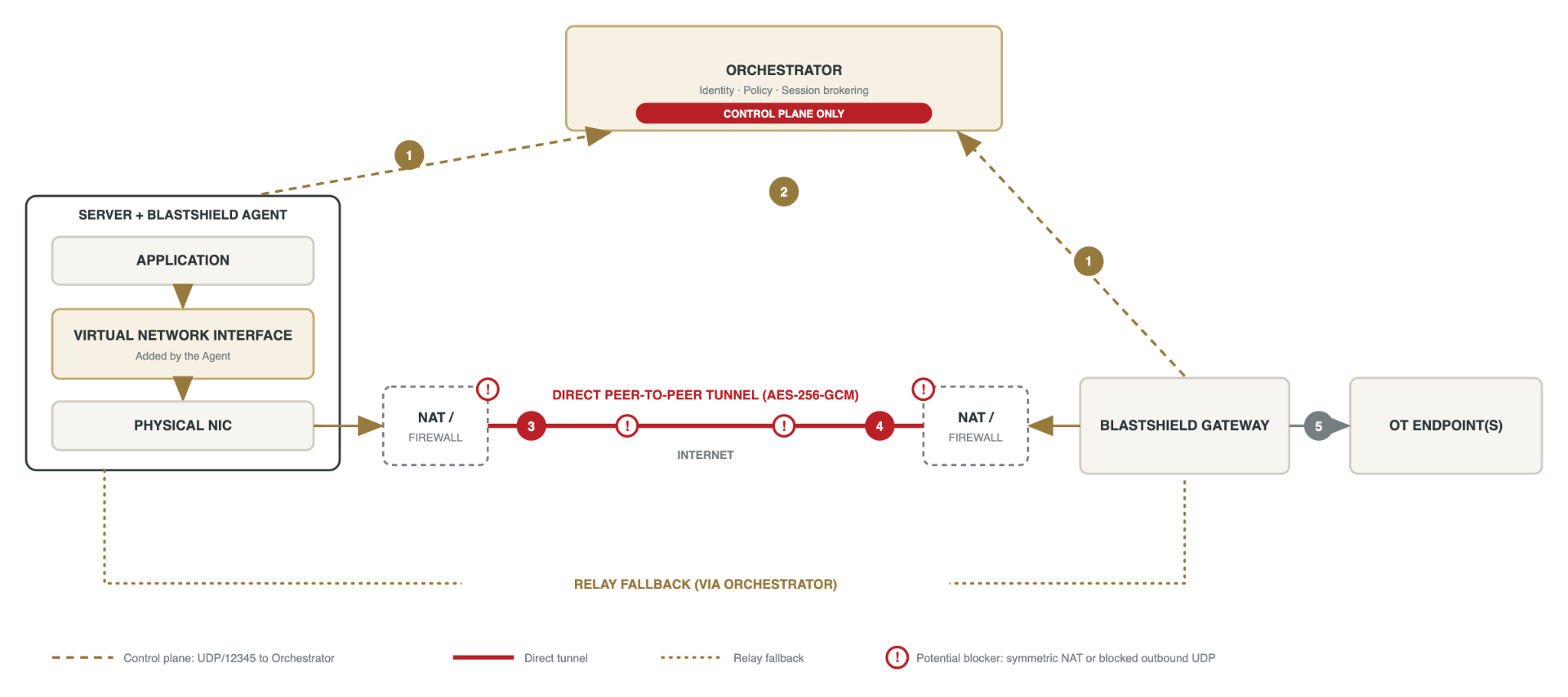
The numbers in the diagram match the steps below. The red exclamation marks show where a symmetric NAT or blocked outbound UDP can stop the direct tunnel.
Before you begin
-
The Agent host and the Gateway each need outbound UDP to the Orchestrator on port 12345.
-
The Agent host also needs outbound UDP to the Gateway. The ports are set by each NAT device and cannot be limited to a single number.
-
No inbound firewall rules are needed on the Agent host or the Gateway. Neither accepts connections.
-
Policy must allow the Agent host to reach the Endpoint.
Supported platforms
-
Linux: Debian 10 and Ubuntu 18.04 LTS and later, CentOS 7 and later. Architectures are arm32, arm64 and x86_64.
-
Windows: Windows Server 2012 and later, Windows 10 and later.
-
macOS: 10.13 and later.
-
Deployments: AWS EC2, Azure VMs, GCP Compute Engine, bare metal and VMware virtual machines.
The virtual network interface
The Agent installs a virtual network interface on the host. It appears next to the physical network card, so the host has two interfaces. Applications on the host send traffic to the BlastShield address of the Endpoint. The virtual interface captures that traffic and the Agent sends it through the encrypted tunnel. The tunnel itself leaves the host through the physical network card as UDP.
Check applications that count interfaces. Some industrial software checks the number of network interfaces at startup and refuses to run when it finds more than one. An AVEVA real-time server is one example. For a host like this, protect it with a Gateway and keep the host as an Endpoint instead of installing an Agent.
How the connection works
Step 1. Outbound registration. The Agent host and the Gateway each send outbound UDP to the Orchestrator on port 12345. Each side's NAT creates a mapping and translates the source port. The Orchestrator records the resulting public address of each peer.
Step 2. Session brokering. Each peer authenticates with its own ECDSA key. The Orchestrator gives each peer the other's public key and public address, then leaves the path. It never carries the session.
Step 3. Simultaneous hole punch. Both peers send packets directly to the address they received, at the same time, from the same sockets they used to reach the Orchestrator. Each outbound packet makes its own NAT accept the reply from the other peer, so the connection is treated as direct.
Step 4. Direct encrypted tunnel. The peers run an ECDHE key exchange over the established path, authenticated by their ECDSA identities. HKDF derives the AES-256-GCM session keys. Traffic captured by the virtual network interface is encrypted and integrity-protected end to end.
Step 5. Gateway handoff. The Gateway ends the tunnel, applies policy and forwards traffic to the Endpoint. The Endpoint runs no BlastShield software and has no route outside the Gateway.
From step 1 onward all communication is UDP. No new ports are assigned. The tunnel reuses the NAT mappings created in step 1.
When the direct path fails
The hole punch works only if each peer presents one stable public port to every destination. Two conditions break this:
-
Symmetric NAT. The NAT assigns a different public port for each destination. The address the Orchestrator gave the other peer is then wrong, so the step 3 packets hit a closed port. This acts like a UDP block at steps 3 and 4. A NAT service used by cloud-hosted servers can behave this way.
-
Blocked UDP at step 3 or 4. A firewall drops UDP between the peers, so the hole punch (step 3) or the tunnel traffic (step 4) never arrives. Either side can cause it. On cloud hosts check the security group or network ACL for outbound UDP.
When the direct path fails, the session falls back to relaying. The Orchestrator forwards packets between the peers. The session keeps working, but traffic takes a longer route and adds latency.
Confidentiality is preserved while relaying. The payload is encrypted with the peer-to-peer key before it is relayed. The Orchestrator decrypts only the outer layer it needs for forwarding.
Check whether a session is relayed
A peer moves through SendingConnect and KeyVerification before it reaches Connected. A short period in Relaying before Connected is normal. A session that stays in Relaying means UDP is blocked at step 3 and/or step 4.
Fix a relayed session
-
Allow outbound UDP from the Agent host and the Gateway to all BlastShield peers. Do not limit it to a destination port.
-
Make sure each NAT presents one public port per source. This is often called endpoint-independent mapping or cone NAT. Disable symmetric or port-randomizing NAT for BlastShield traffic.
-
If the device cannot do this, exempt BlastShield UDP from the NAT or firewall policy that randomizes ports, using a rule scoped to the BlastShield hosts.
-
Confirm the peer reaches Connected and stays there.
|
Note |
|---|
|
If the direct path cannot be allowed, relaying remains a working fallback. |